

How to make a zoom in video from a photo
- Upload a clear photo (JPG, PNG or WebP). A face or body that fills a good part of the frame works best.
- Pick the zoom in motion — a slow push-in with depth, and the shape: 9:16 for TikTok and Reels, 16:9 for YouTube, 1:1 for feeds.
- Tick the box confirming you have the right to use the photo, then press Make my video.
- Wait about a minute. Play it, download the MP4, or share a link.
AI zoom vs a Ken Burns zoom
A Ken Burns zoom in a video editor scales the flat picture, so everything grows at the same rate. MoveFrame's AI zoom rebuilds the scene in depth: the subject comes forward, the background drifts behind it, and hair or fur moves a little. That is why it reads as a camera move instead of a crop.
- Best for: slideshows, music videos, real-estate and product shots, travel photos, Reels openers.
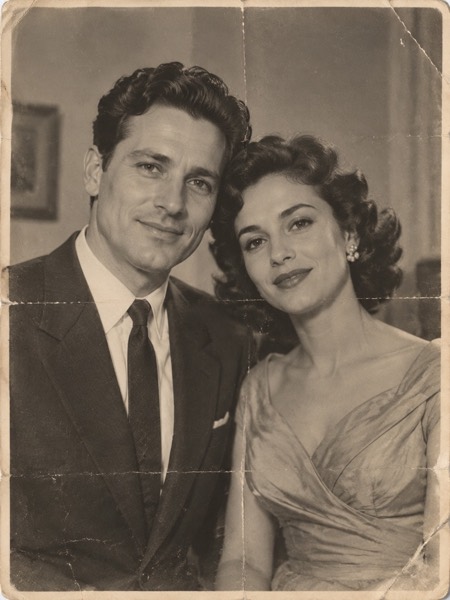
- Works with: people, pets, objects, landscapes and old prints (see the vintage couple above).
MoveFrame vs Pollo AI and Magic Hour for zoom videos
Checked on 18 October 2026 on each site's own pages, logged out. Features and prices change — check before you buy.
| MoveFrame | Pollo AI | Magic Hour | |
|---|---|---|---|
| A ready-made zoom motion | Yes, one tap, from your own photo | "Earth Zoom In" effect (sign-in first) | No dedicated zoom template; camera moves by prompt |
| Upload a photo without an account | Yes — 2 free 5-second videos a day | Sign-in before upload | Free plan with starter credits |
| Cheapest paid option | $9.90 once, valid 12 months | See pollo.ai/pricing | Creator $19/month; packs from $10 |
| Failed video refunded | Automatically | Not stated | Not stated on the pricing page |
| Real before/after results on the page | Yes, 3 unedited clips above | Sample clips | Template preview |
MoveFrame is independent and not affiliated with Pollo AI or Magic Hour. Their names are trademarks of their owners.
Sizes, lengths and quality
| Setting | Free | With credits |
|---|---|---|
| Length | 5 seconds | 5 or 10 seconds |
| Shape | 9:16, 16:9 or 1:1 | 9:16, 16:9 or 1:1 |
| Quality | Standard 480p | Standard, HD 720p or Max 720p (premium model) |
| Watermark | Small corner mark | None |
| Cost | 5 credits (free daily credits cover 2) | 5–40 credits |
Every video downloads as an H.264 MP4 that plays on iPhone, Android, TikTok, Instagram Reels, YouTube Shorts and WhatsApp.
Frequently asked questions
Is it really free?
Yes. You get 10 free credits every day — enough for 2 five-second videos — with no account and no card. Free videos are Standard quality with a small watermark. Credit packs start at $9.90 for 100 credits (valid 12 months, no subscription); Pro is $9.90/month for 120 credits.
Can I zoom out instead of in?
Type "slow zoom out" in the extra direction box. The default is a slow push-in.
Does it work on old or blurry photos?
Yes. The vintage couple above is an old print. Very small or very blurry photos still work, but the zoom shows the blur — run the result through the upscaler for a sharper final clip.
Will people's faces change?
The motion is mostly the camera, so faces stay very close to the original. People need to be adults; the photo is checked before anything is charged.
How long does it take?
Most 5-second videos are ready in 40–90 seconds. 10-second and Max quality videos can take up to 3 minutes. You can keep using the page while it works.
What if the video fails or my photo is rejected?
Credits come back automatically. A photo that fails the safety check is rejected before any credit is spent, and a video that fails during generation is refunded in full.